TMS for small brokers
The TMS for small freight brokers, with carrier verification built in.
Loads, dispatch, invoicing and carrier pay in one system, with verification on the same screen. You get what a growing brokerage needs without stitching three tools together, and an expired verification blocks the booking.
Expired verifications block booking
Is it time?
Signs you’ve outgrown the spreadsheet
Plenty of good brokerages start on a spreadsheet, a load board and email. It works until a load gets missed or an invoice goes out late.
- You can’t answer “where’s that load?” without asking someone.
- Invoices wait on paperwork nobody can find.
- Two people have different versions of the same sheet.
- Carrier checks live in one place and dispatch in another, so nobody can say for sure that the carrier on this load was checked.
- You know your revenue, but not your margin by customer or lane.
A TMS should fix those without a months-long project.
What’s included
What a small brokerage actually needs, on one login
From tender to load
Drop in the customer’s tender or paste the email, and the new load opens filled in. Credit exposure stays on screen, and you can stop a load that goes over the limit.
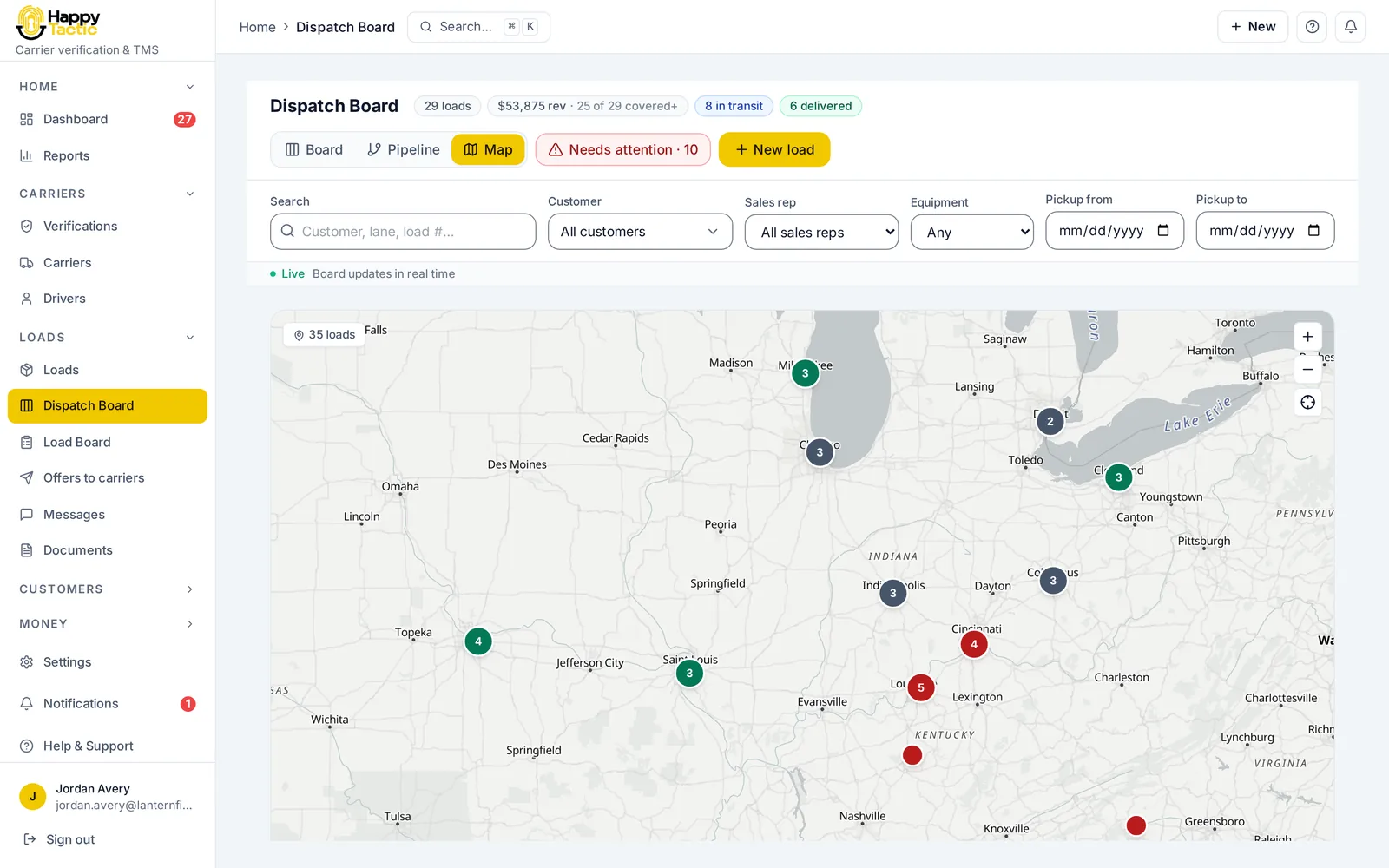
A board that shows what needs you
Drag loads across the board and watch the map update by itself. Needs attention puts late trucks, no-shows and missing PODs first.
Offers with no carrier login
Carriers accept, counter or decline from a secure link. You offer to carriers with a current verification, with suggestions and rate help from your own lane history. Market rates come from DAT and Truckstop.
Theft and payment-fraud protection
Red flags for the wrong phone or a faked location, a pickup number held back until the verified driver’s phone is tracking, and pay-detail changes that wait for approval.
Paperwork made for you
Rate cons, dispatch sheets with the money taken out, BOLs, invoices and NOAs, with e-signature on rate cons.
Invoicing and carrier pay
Bill from the load page, or batch the clean ones. Net terms per customer, detention suggestions, send to any factor by email, pay runs and claims.
Tracking by text
Dispatch texts the driver a link, in English or Spanish. Check-ins, location and POD need no app, and ETAs allow for driver breaks.
QuickBooks Online
Customers, invoices and payments sync, so your accountant stays in the system they already use.
Reports you’ll use
20+ reports including profitability, lanes, on-time, carrier performance and days to pay, plus CSV and Excel export.
Fifteen automatic steps
Status moves, invoice drafts and reminders run on their own, each with its own switch. See all fifteen.
Fewer “where’s my load?” calls
Each customer gets a portal link to their own loads and shared documents, with no login, plus scheduled reports.
EDI when a customer asks
204 tenders arrive as draft loads, by file or SFTP. No Enterprise contract needed.
Your old data and your AI assistant
Import from your old TMS with EZ Loader presets. The AI assistants connector runs loads, carriers and invites from Claude or ChatGPT. Developers.

Check the carrier and run the load in the same place.
The difference
Three separate tools vs. one
| Question | Spreadsheet, load board, separate vetting | Happy Tactic |
|---|---|---|
| Was this carrier checked? | Look it up somewhere else | Shown on the load, right where you book |
| Insurance lapses mid-month | You find out later, if at all | Alert, and the carrier goes on hold |
| Where’s the load? | Call the driver | Text link, live map, customer tracking page |
| Getting the invoice out | Hunt for the POD | POD comes from the driver, the invoice draft follows |
| Re-typing carrier details | Into each tool | Verify, sign, dispatch, without re-typing |
Pricing
Plain pricing, by size of operation
- Regional, $299 a month. Full TMS, 15 verifications included then $15 each, 5 seats.
- Linehaul, $499 a month. 30 verifications included then $12 each, 10 seats, priority support and advanced risk rules.
- Fleet, $750 a month. 50 verifications included then $9 each, 15 seats, priority onboarding and support, advanced risk rules.
Extra seats are available on each plan. See the pricing page for the details.
Questions brokers ask
Straight answers.
What is the best TMS for a small freight broker?
It depends on your volume and how you work, so try the ones on your shortlist with real loads. For a small brokerage, look for dispatch, invoicing and carrier payment in one place, a QuickBooks connection, simple pricing and no heavy implementation. We built Happy Tactic for brokers who also want carrier verification built into the TMS rather than bolted on.
How much does a TMS cost for a small brokerage?
Our full TMS starts with the Regional plan at $299 a month, including 5 seats and 15 carrier verifications. Linehaul is $499 with 10 seats and 30 verifications, and Fleet is $750 with 15 seats and 50. When comparing vendors, ask about setup fees, per-user fees and contract length as well as the headline price.
When should a freight broker move off spreadsheets?
Usually when loads get missed, invoices go out late, two people are editing the same sheet, or you can’t quickly answer which carrier has which load. If you’ve vetted carriers in one place and dispatched them in another, that’s a sign too.
Does it work with QuickBooks?
Yes. Customers, invoices and payments sync with QuickBooks Online.
Do my carriers and drivers need logins?
No. Carriers accept tenders and sign rate confirmations through secure links. Drivers get a text link for check-ins, location and proof of delivery, with no app to install.
Can I bring my existing data?
Yes. Import from your old TMS with a preview first and presets for EZ Loader exports. CSV and Excel export are available throughout, so your data stays yours. Automations never act on imported history.
How much of this runs on its own?
Fifteen automatic steps cover status moves, paperwork, payments and reminders. Each has its own switch. Sending invoices and approving carrier bills start off, so you review first.
Does the Hotshot plan include the TMS?
No. Hotshot at $150 a month is the verification suite only, for brokers who already run another TMS or don’t need one yet. The full TMS starts at Regional.
Run your next load on it.
Book a call with a founder and watch a load go from tender to paid.